
Horizon – Agent Update – Unable to see the last version

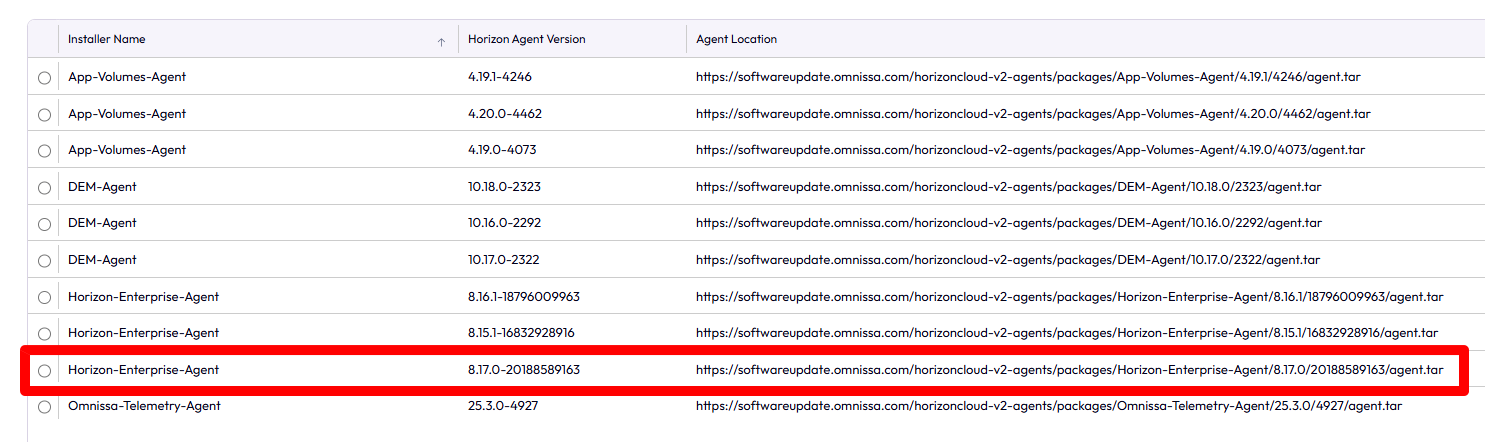
After updating Horizon to version 2512, I noticed that the latest versions (8.17) weren’t being displayed in the Agent Updates section.


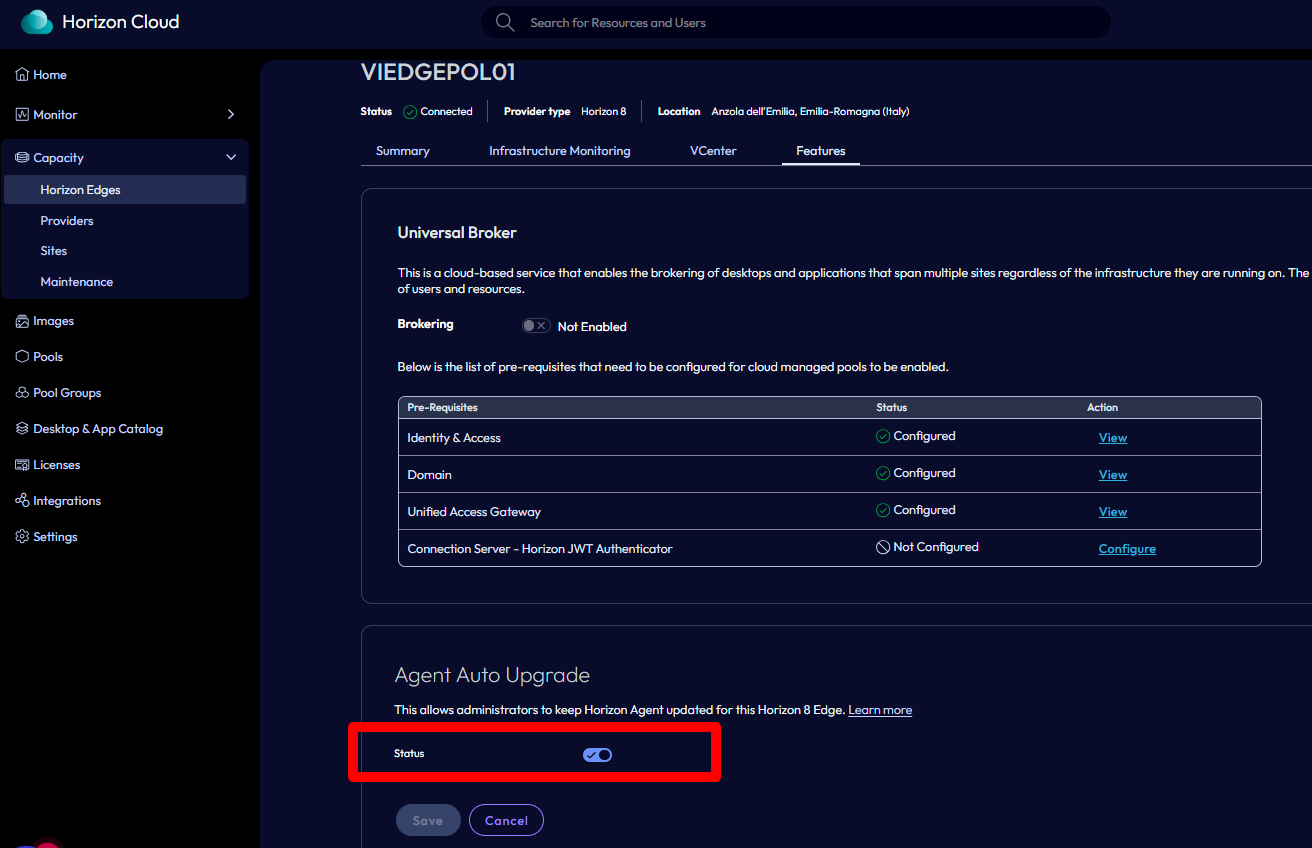
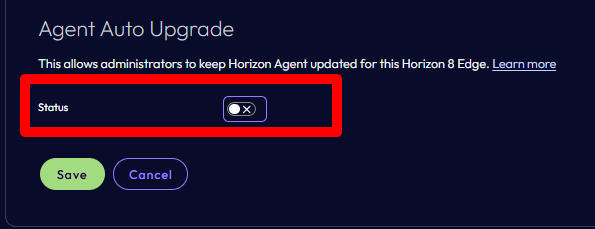
To see the latest versions, I had to disable the Agent Update service on the Omnissa Connect side. Simply go to the Capacity section, select the relevant edge gateway,

and disable the specific option in the Features section.


Re-enable it after a few minutes.

After a few minutes, the latest versions also appeared in the Horizon console.

Horizon – Agent Update – Unable to see the last version

Migrazione delle impostazioni di Horizon Client da VMware a Omnissa con Omnissa DEM

Con il rebranding di VMware Horizon Client in Omnissa Horizon Client, uno degli aspetti spesso sottovalutati è la migrazione delle impostazioni utente.

Nel contesto in cui ho dovuto operare la necessità principale era replicare le impostazioni dell’Horizon Client (dalla versione VMware a quella Omnissa) in un contesto di VDI. Le impostazioni fondamentale da copiare erano quelle del “Drive & Folder Sharing”

In ambienti enterprise – specialmente VDI non persistenti gestiti con Omnissa Dynamic Environment Manager (DEM) – è fondamentale garantire che:

• le impostazioni dell’utente vengano mantenute
• la migrazione avvenga una sola volta
• non ci siano impatti sui logon successivi

In questo articolo vediamo come migrare automaticamente le impostazioni del client Horizon:

• da:

%AppData%\VMware\VMware Horizon View Client

• a:

%AppData%\Omnissa\Omnissa Horizon Client

utilizzando uno script PowerShell integrato correttamente in Omnissa DEM.


Prerequisiti

Configurazione di DEM per esportare le personalizzazioni di:

  • VMware Horizon Client
  • Omnissa Horizon Client
  • Chiave di registro di controllo

Precisamente:

.

.

Approccio

La soluzione si basa su tre concetti chiave:

1.Script PowerShell in contesto utente
2.Logon Task in Flex Configuration (DEM)
3.Condition basata su chiave di registro HKCU per garantire l’esecuzione una sola volta

La chiave di registro viene salvata nel profilo utente e gestita da DEM, rendendo la soluzione compatibile con:

• VDI floating
• desktop non persistenti
• profili DEM

.

Script PowerShell

Lo script seguente:

• verifica se la migrazione è già avvenuta
• copia le impostazioni se presenti
•scrive una chiave di registro per bloccare le esecuzioni successive
# ==============================
# Omnissa Horizon Client Migration
# ==============================

$SourcePath = Join-Path $env:APPDATA "VMware\VMware Horizon View Client"
$DestinationPath = Join-Path $env:APPDATA "Omnissa\Omnissa Horizon Client"

# Registry key (per-utente)
$RegPath = "HKCU:\Software\Omnissa\Migrations"
$RegName = "HorizonClientSettingsMigrated"

# ---- Controllo se già eseguito ----
if (Test-Path $RegPath) {
    $Migrated = Get-ItemProperty -Path $RegPath -Name $RegName -ErrorAction SilentlyContinue
    if ($Migrated.$RegName -eq 1) {
        exit 0
    }
}

# ---- Verifica sorgente ----
if (-not (Test-Path $SourcePath)) {
    # Scriviamo comunque la chiave per evitare retry inutili
    New-Item -Path $RegPath -Force | Out-Null
    New-ItemProperty -Path $RegPath -Name $RegName -Value 1 -PropertyType DWORD -Force | Out-Null
    exit 0
}

# ---- Creazione destinazione ----
New-Item -Path $DestinationPath -ItemType Directory -Force | Out-Null

# ---- Copia contenuto ----
Copy-Item -Path "$SourcePath\*" `
          -Destination $DestinationPath `
          -Recurse `
          -Force `
          -ErrorAction SilentlyContinue

# ---- Scrittura chiave di completamento ----
New-Item -Path $RegPath -Force | Out-Null
New-ItemProperty -Path $RegPath -Name $RegName -Value 1 -PropertyType DWORD -Force | Out-Null

exit 0

Lo script lo posizioniamo nella share Config di DEM creando una cartella chiamandola script. Nel mio caso

C:\DEMConfig\Script 

.

Configurazione in Omnissa DEM

Lo script deve essere configurato come Logon Task per cui dalla console di DEM:

• User Environment→ Logon Tasks
• Name:

Migrate Horizon Client Settings (VMware → Omnissa)

• Command:

powershell.exe  -ExecutionPolicy Bypass -NoProfile -File \\fs02.pollaio.lan\DEMConfig\Scripts\Migrate-HorizonClientSettings.ps1

Condition (fondamentale)

• Hive: HKEY_CURRENT_USER
• Key: Software\Omnissa\Migrations
• Value: HorizonClientSettingsMigrated 
non è uguale a 1 


Qui il video dove replico tutti i passaggi e provo il tutto:

.

Migrazione delle impostazioni di Horizon Client da VMware a Omnissa con Omnissa DEM

Omnissa Dynamic Environment Manager 2406 and User-Managed Auto-Start Shortcuts


The Dynamic Environment Manager 2406 has many new functions, we can read all the info about this version in the following link:

Omnissa Dynamic Environment Manager Release Notes


I want to write about the “User-Managed Auto-Start Shortcuts”.

To use this new function it is necessary to:

  1. upgrade FlexEngine Agent to 2406 on VDI (Master Image or VDI Full Clone):
  • For AD agent install -> update the ADMX template (On Active Directory Central Store)

                   We need to modify or create a GPO (assigned to the OU where the VDI are allocated) and                           enable the “User-Managed Auto-Start Shortcuts”

                   User Configuration -> Policies -> Administrative Templates: Policy Definitions -> VMware                       DEM -> FlexEngine -> Self-Support -> Allow managing auto-start shortcuts and set it to                         Enable

  • For NOAD agent Install -> Use this parameter ManageAutoStartShortcuts, on the upgrade step, and set it to 1 to configure properly the self-support tools
  1. upgrade DEM console to 2406

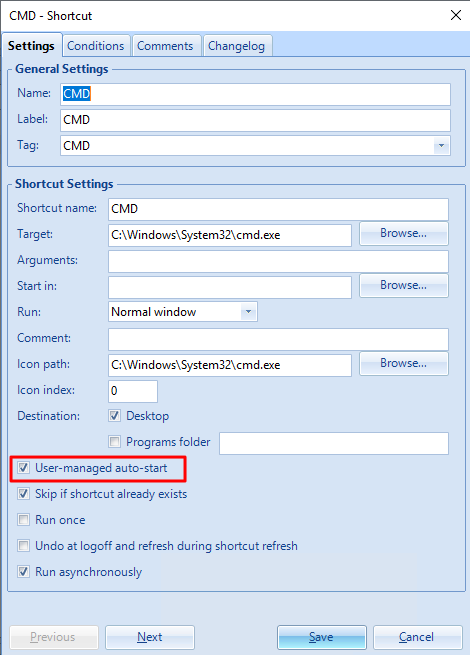
Now in DEM Console (under User Environment), we need to create ShortCuts like this

A screenshot of a computer

Description automatically generated

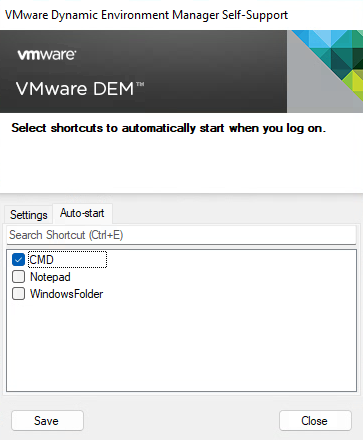
We need to enable “User-managed auto-start”

Now when the users log in to their VDI and launch the DEM Self-support program, they can select which shortcut applications automatically start when they log on:

A screenshot of a computer

Description automatically generated

Click SAVE and Close

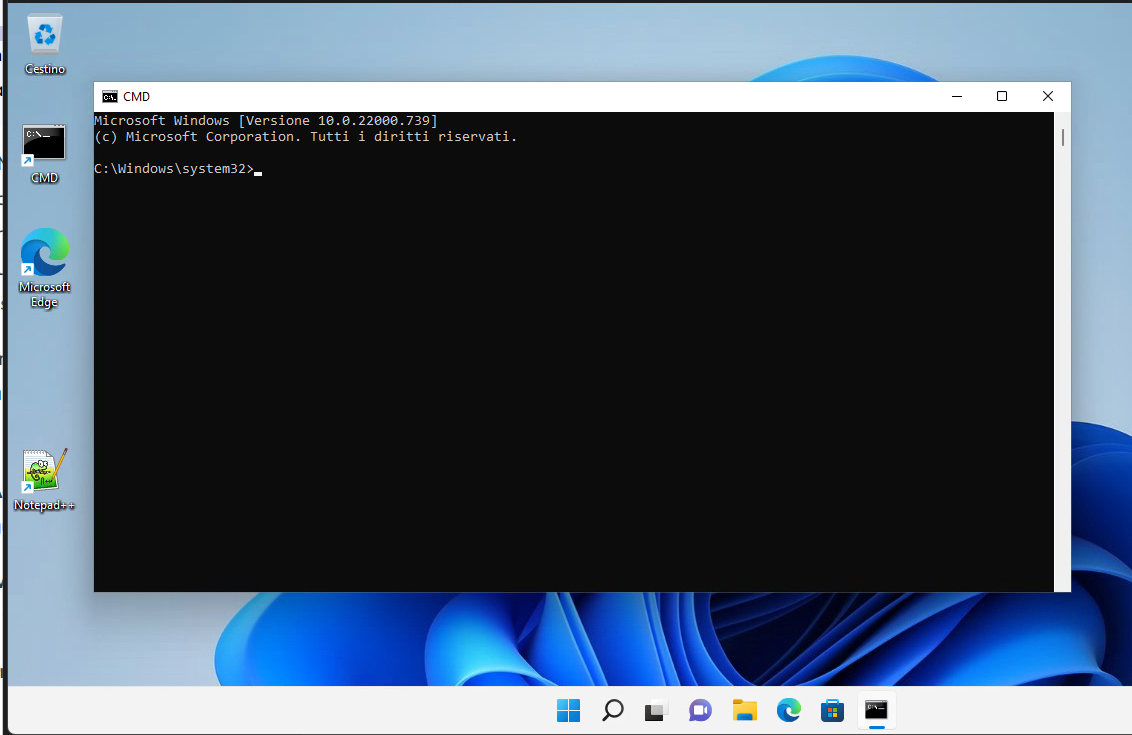
Now at the next login……

A screenshot of a computer

Description automatically generated

Omnissa Dynamic Environment Manager 2406 and User-Managed Auto-Start Shortcuts

EUC, un futuro luminoso per Horizon

A black and white logo

Description automatically generated A logo of a software company

Description automatically generated A logo for a company

Description automatically generated A close up of a logo

Description automatically generated

In questi giorni c’è molto fermento nel mondo dell’EUC (‘End-User Computing) in merito alla comparsa sul mercato di un nuovo nome.

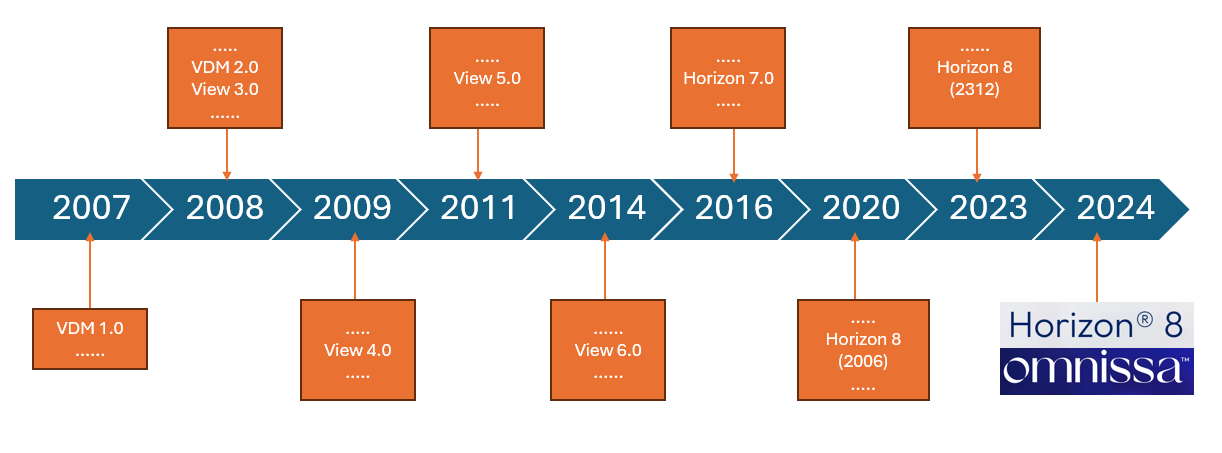
Ma partiamo con ordine, nel lontano 2008 mi avvicino al modo delle VDI (Virtual Desktop Infrastructure) inizialmente con l’automatizzazione di aule corsi, grazie a VMware e al suo prodotto che allora era stato appena rinominato in Horizon View (se non sbaglio precedentemente si chiama VMware VDM….. ancora oggi, nelle installazioni dei Connection Server, troviamo una cartella VDM sotto c:\ProgramData).
A diagram of a timeline

Description automatically generated with medium confidence

Col tempo le soluzione VDI di VMware sono evolute in maniera importante con l’aggiunta prima della tecnologia linked clones e poi con le instant clone (tecnologie che permettono di semplificare notevolmente la vita dell’amministratore delle postazioni di lavoro).

Abbiamo visto l’affiancare a Horizon soluzioni che permettono di sfruttare al meglio le VDI come App Volumes, DEM (Dynamic Environment Manager), Workspace One ecc.…

Poi dall’on-premise è stato portato anche sul Cloud con soluzione come Horizon Cloud on Microsoft Azure.

Anche per la mia carriera lavorativa il mondo delle VDI ha lasciato un solco importante dal 2021 sono vEXPERT (Con specificità nel mondo EUC) e dal 2024 sono EUCExpert e collaboro con VMware/Broadcom nel deploy.

Mi direte ok sono cose che ormai conosciamo ma quindi che cosa è successo??

Bene, sappiamo tutti che VMware è stata acquisita da Broadcom e una delle prime dichiarazioni della nuova proprietà è stata quella di non volere investire sull mondo EUC.

Ma quindi che succede?

Tutto i prodotti EUC di VMware sono riconosciuti tra i leader del mercato dei prodotti VDI e Desktop as a Service sono stati comprati da KKR (Fondo Americano nato nel 1977) per cui nasce Omnissa

A blue and white logo

Description automatically generated

Nata con persone VMware per garantire la stessa qualità e lo stesso sviluppo in innovazione che è stato garantito in questi anni.

In cui continua o parte una nuova vita (scegliete voi) per tutti i prodotti EUC che molti noi conosciamo e apprezziamo  (Horizon ecc…)

Ne vedremo sicuramente delle belle e ci aspetta un futuro luminoso!

EUC, un futuro luminoso per Horizon

VMware Horizon 2312

As usual, every 3 months VMware releases a new version of Horizon (and also of almost all EUC applications)
The following have been available for a few days:
Horizon 8 2312
App Volumes 4 2312
Dynamic Environment Manager 2312
ThinApp 2312

Among the various features released for Horizon 8, the most interesting one is Agent Auto Upgrade:

“The agent auto upgrade feature allows customers to automatically initiate upgrades without manual intervention. To utilize this feature, on-premises systems must have access to CDS servers. Customers without CDS access can establish their webserver, host the agent components, and then register the agent build with the connection server to upgrade agents in VDI/RDSH desktops. This feature requires Horizon Plus or Horizon Universal License, and is available for Full Clone Desktops and RDSH Servers only. To upgrade Horizon Agent in Instant Clone Desktop Pools or RDS Farms, upgrade Horizon Agent on the Golden Image and schedule maintenance to push the new image.”

VMware Horizon 2312

VMware Horizon 8 2303

At the end of March 2023, new versions of the products that make up the Horizon suite were released. (Connection Server, Volume App, DEM, and Unified Access Gateway)

There are several interesting features, below I report the link to each release note.

I bring to your attention the presence of AppVolume in a preview solution related to the use of AppVolume in the Azure environment. (This deployment option is intended for applications packages and not Writable Volumes)

Horizon

VMware Horizon 8 2303 Release Notes

App Volume on Azure

VMware App Volumes Manager Deployment Guide for Azure –

App Volume 

VMware App Volumes 4, version 2303 Release Notes

DEM

VMware Dynamic Environment Manager 2303 Release Notes

Unified Access Gateway

Unified Access Gateway 2303 Release Notes (vmware.com)

VMware Horizon 8 2303