vCenter Server Preupgrade check result error: “VMDir Replication between partners is not working”

vCenter upgrade Pre-Check fail with “VMDir replication is not working correctly”

When I tried to upgrade my vCenter to the last version of 8u3 on the pre-check command, I found this error
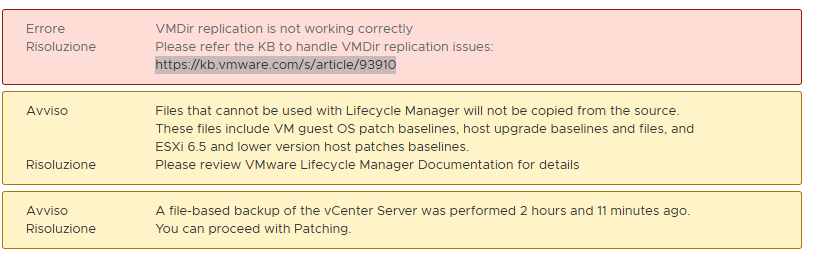
A screenshot of a computer error message

AI-generated content may be incorrect.

Because I attached another vCenter at the same PSC, it is now broken.

For deleting the missed vCenter:

Take a vCenter snapshot

Check the vCenter name:

The name is vcenter02.pollaio.lan

Remove the old vCenter:

A computer screen with white text

AI-generated content may be incorrect.

After automatic service restart

Now the upgrade pre-check does not have an alert message
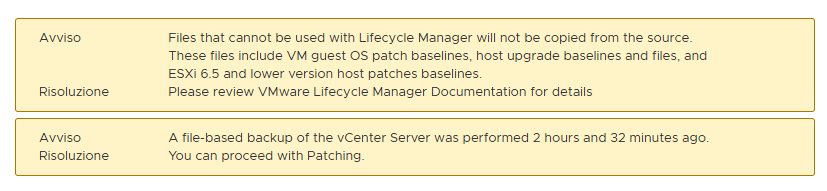
A screenshot of a computer

AI-generated content may be incorrect.

Reference

vCenter Server Preupgrade check result error: “VMDir Replication between partners is not working”

vCenter Server Preupgrade check result error: “VMDir Replication between partners is not working”

Horizon Published Applications and Office 365 – Error TAG [4ruy5]

After public Office 365 App with Horizon 8 (the backend is a RDS FARM and we used this indication for the installation Deploy Microsoft 365 Apps by using Remote Desktop Services – Microsoft 365 Apps | Microsoft Learn) we have this issue when the users start the Office 365 remote apps

I found this info:

O365 via Horizon : r/sysadmin

To resolve this problem, we started an additional program (shellapptunime.exe added a Scripts logon) when the user’s access to the RDS infrastructure.

A screenshot of a computer

AI-generated content may be incorrect.

Horizon Published Applications and Office 365 – Error TAG [4ruy5]

