App Volumes 2406

As anticipated in my previous posts, version 2406 of Omnissa’s EUC products (the company that took over VMware’s EUC products) has been released. New versions of the following are present:

  • App Volumes
  • Horizon
  • Unified Access Gateway
  • Dynamic Environment Manager

In the next posts I present some of the most interesting new features that are present in these new releases.

Let’s start with App Volumes and talk about:

  • Volumes App for Persistent Desktop
  • Extending the App Volumes solution to other platforms
  • Assign different versions of the same application to a user

Volumes App for Persistent Desktop

  • The solution until the version before 2406 was only available for non-persistent desktops (Instant Clone)
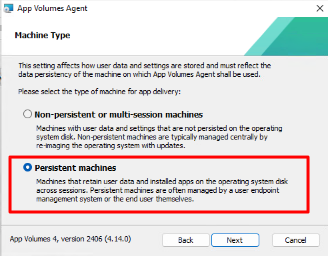
  • From the 2406 it is also possible to use it with persistent desktops

The main difference is present in the installation of the agent where it is asked on which type of desktop we are installing the App Volumes agent
A screenshot of a computer

Description automatically generated

In its nature of profile management, the use of App Volumes on a persistent machine is only possible with App Stacks and not with Writable Volumes

Extending the App Volumes solution to other platforms

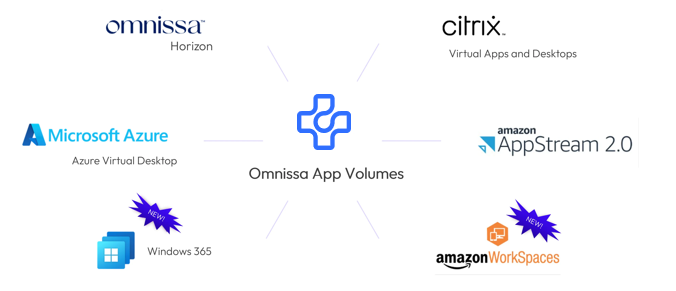
The ability to use App Volumes with VDI is not only of Horizon infrastructure, from version 2406 it is possible to use with Windows 365 and with Amazon WorkSpaces
A group of logos on a white background

Description automatically generated

Assign different versions of the same application to a user

Leveraging Apps on Demand, end users can now select from multiple packages of an application at launch, providing flexibility to try out new versions or launch specific ones

Other assignment options: “Marker,” and “Package,”, now we are the “Multiple,” option enhancing application management and deployment flexibility.

App Volumes 2406

Use PostgreSQL for Horizon DB events

In most Horizon infrastructure Microsoft SQL is used to host the event DB. It is possible to use Oracle and also PostgreSQL, this last possibility allows us to reduce the costs by using a free Linux version as OS (See Oracle Linux) and not add costs for the DB. 

Requirements

Horizon Connection Server infrastructure

Oracle Linux v9 virtual machine

PostgreSQL Installation on Oracle Linux

On Oracle Linux

#Check last version of all packages

sudo dnf update

#Install PostgreSQL

sudo dnf install postgresql-server postgresql-contrib

sudo postgresql-setup –initdb

sudo systemctl start postgresql

sudo systemctl enable postgresqls

#Create PostgreSQL User and DB

sudo -u postgres createuser horizonuser –pwprompt

sudo -u postgres createdb -O horizonuser HorizonEvent

#Enable remote access to PostgreSQL

netstat -nlp | grep 5432

cd /var/lib/pgsql/data/

vi postgresql.conf

Access with postgres user

su – postgres

cd data

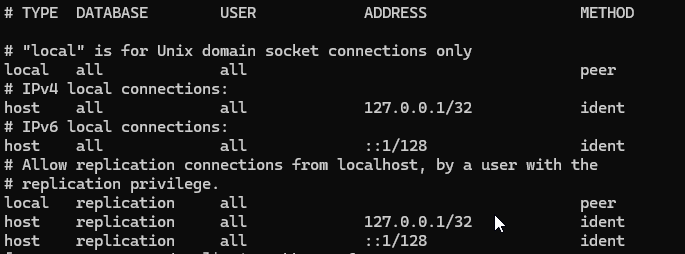
cat pg_hba.conf

A screen shot of a computer

Description automatically generated

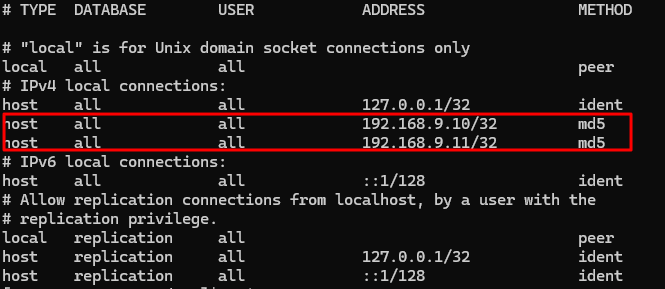
Modify the pg_hba.conf file and add the Connection Server IP address. Follow this documentation

Prepare a PostgreSQL Database for Event Reporting in Horizon Console (omnissa.com)

vi pg_hba.conf

A screen shot of a computer

Description automatically generated

firewall-cmd –zone=public –add-port=5432/tcp –permanent

firewall-cmd –reload

PostgreSQL Service restart

systemctl restart postgresql.service

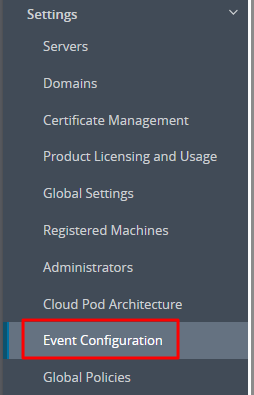
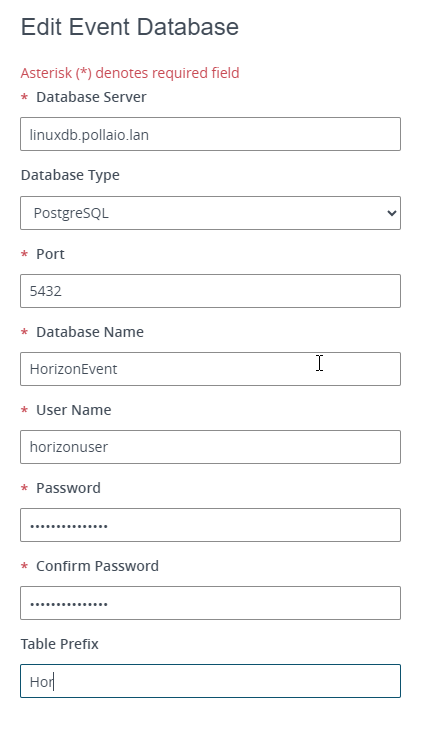
#Configure the Horizon infrastructure to use the PostgreSQL DB for the event

A screenshot of a computer

Description automatically generated

A screenshot of a login form

Description automatically generated

Use PostgreSQL for Horizon DB events

App Volumes 2406 and Unified Access Gateway 2406

All of VMware’s EUC products were continuously updated (in recent years almost always every 3 months) to add new features, fix bugs and mitigate security vulnerabilities.

The move to Broadcom and the subsequent sell of EUC products in Omnissa has brought a few months of stabilization… but I’m happy to announce that versions 2406 of the App Volumes and Unified Access Gateway products are out.

What do we find new?

A logo with text on it

Description automatically generated

App Volumes

Persistent Desktop Support

Expanded Use Cases: New support for classic Windows desktop environments, a significant enhancement to our Apps Everywhere strategy. This new feature extends our efficient one-to-many provisioning model, previously available only for non-persistent desktops, to persistent virtual desktop environments.

And more…

Replicate Application Packages in Specific Stages

We are excited to introduce the Replicate Application Packages in Specific Stages feature, designed to enhance the life cycle management of applications across multiple instances of App Volumes Manager

And more…

Select a specific Package Version when Launching an App (Technology Preview)

Writable Volumes Performance Improvements

Here the Release Notes

A logo of a cloud security system

Description automatically generated

Unified Access Gateway

Added support for Horizon Connection Server’s Home Site Redirection feature (associated with Cloud Pod Architecture)

Added support for Basic and NTLM authentications in outbound proxy configuration.

Added support in PowerShell script to enable/disable monitoring of unrecognized sessions using the new field unrecognizedSessionsMonitoringEnabled.

And more..

Here the Release Notes 


The 2406 version of the Connection Server ……..stay tuned!

App Volumes 2406 and Unified Access Gateway 2406

VMware vSphere Foundation for VDI (VVF for VDI)

A blue and white logo

Description automatically generated

A black text on a white background

Description automatically generated

The exit of EUC services from Broadcom (after the acquisition of VMware by the US giant) has brought a situation of uncertainty for all those who have been appreciating for years the features of the VDI/Applications published with Horizon and all the products of the EUC ecosystem that were from VMware.

The birth of Omnissa (effective from the beginning of July) bodes well for the future (more information in this post of mine from a few weeks ago).

Of the many synergies that were natural when vSphere and Horizon were children of the same mother, the first uncertainty was the licensing issue.

VMware gave the possibility, once a specific Horizon license was purchased, to have the vSphere virtualization infrastructure licenses, practically a solution ready to be only implemented. (I remind you that Horizon also goes on other Hypervisors… obviously exploits 10% of the potential… on this issue. I expect news from Omnissa since vSphere and Horizon are no longer brothers). The only limitation of the vSphere license included in Horizon was the need to run on the vSphere platform, licensed with Horizon, only VDI environments and the servers necessary for operation (Connection Server ,,, App Volumes Manager etc ..)

Now that vSphere and Horizon no longer have the same mother, what happens to these licenses? Will I still be able to buy a bundle with Horizon and vSphere together?

This link explains that the best of the matter:

Setting the record straight: EUC to continue to offer Horizon with vSphere and vSAN (omnissa.com)

Where it is indicated that there will be a collaboration between Omnissa and Broadcom to allow the presence of a bundle with Horizon and vSphere.

A green and white logo

Description automatically generated

So it is still possible to purchase one of the following licenses:

  • Horizon Enterprise term
  • Horizon Universal,
  • Horizon Enterprise Plus
  • Horizon Standard Plus
  • Horizon Apps Universal

What is the name of the vSphere package included in Horizon Solutions?

VMware vSphere Foundation for VDI (VVF for VDI)

What does it include?

• vSphere Enterprise Plus

• vCenter Standard

• vSAN Enterprise (100 GB) (licensed per Core)

So how much space have I included in vSAN?

Well, the game is quite simple: for each core of my vSphere cluster on which I host VDI and on which I have the VVF for VDI licenses, just multiply 100GB by the number of CORES. (there are no restrictions on the number of cores)

Let’s focus on the vSAN Enterprise license… what difference do we have from the previous Bundle?

  • vSAN Enterprise includes the same features as vSAN Advanced plus all those of vSAN Enterprise which are:
    • Data-at-rest and data-intransit encryption
    • File services
    • VMware HCI Mesh™2

In this link more information:

VVF_VDI_SPD_July2024.pdf (broadcom.com)

VMware vSphere Foundation for VDI (VVF for VDI)

EUC, un futuro luminoso per Horizon

A black and white logo

Description automatically generated A logo of a software company

Description automatically generated A logo for a company

Description automatically generated A close up of a logo

Description automatically generated

In questi giorni c’è molto fermento nel mondo dell’EUC (‘End-User Computing) in merito alla comparsa sul mercato di un nuovo nome.

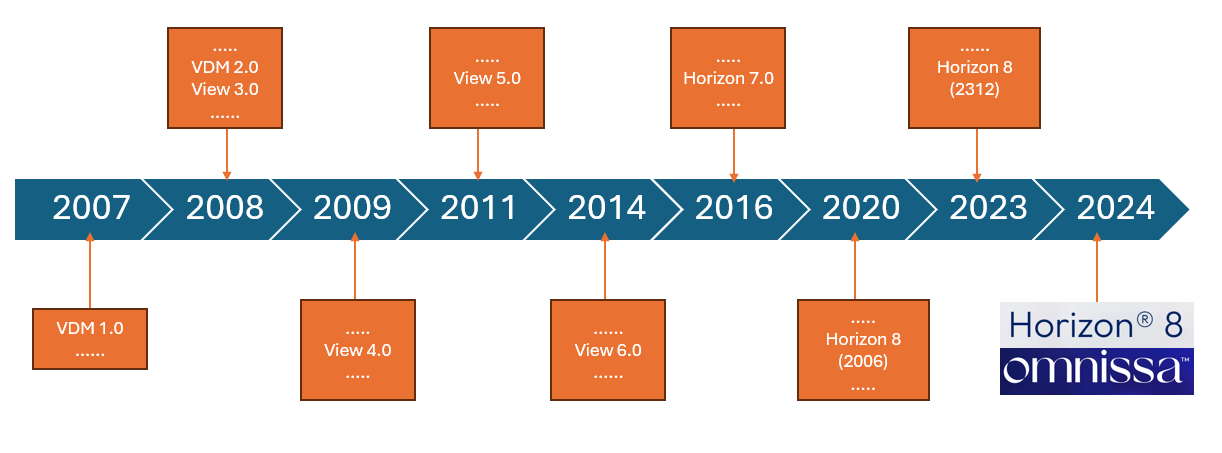
Ma partiamo con ordine, nel lontano 2008 mi avvicino al modo delle VDI (Virtual Desktop Infrastructure) inizialmente con l’automatizzazione di aule corsi, grazie a VMware e al suo prodotto che allora era stato appena rinominato in Horizon View (se non sbaglio precedentemente si chiama VMware VDM….. ancora oggi, nelle installazioni dei Connection Server, troviamo una cartella VDM sotto c:\ProgramData).

A diagram of a timeline

Description automatically generated with medium confidence

Col tempo le soluzione VDI di VMware sono evolute in maniera importante con l’aggiunta prima della tecnologia linked clones e poi con le instant clone (tecnologie che permettono di semplificare notevolmente la vita dell’amministratore delle postazioni di lavoro).

Abbiamo visto l’affiancare a Horizon soluzioni che permettono di sfruttare al meglio le VDI come App Volumes, DEM (Dynamic Environment Manager), Workspace One ecc.…

Poi dall’on-premise è stato portato anche sul Cloud con soluzione come Horizon Cloud on Microsoft Azure.

Anche per la mia carriera lavorativa il mondo delle VDI ha lasciato un solco importante dal 2021 sono vEXPERT (Con specificità nel mondo EUC) e dal 2024 sono EUCExpert e collaboro con VMware/Broadcom nel deploy.

Mi direte ok sono cose che ormai conosciamo ma quindi che cosa è successo??

Bene, sappiamo tutti che VMware è stata acquisita da Broadcom e una delle prime dichiarazioni della nuova proprietà è stata quella di non volere investire sull mondo EUC.

Ma quindi che succede?

Tutto i prodotti EUC di VMware sono riconosciuti tra i leader del mercato dei prodotti VDI e Desktop as a Service sono stati comprati da KKR (Fondo Americano nato nel 1977) per cui nasce Omnissa

A blue and white logo

Description automatically generated

Nata con persone VMware per garantire la stessa qualità e lo stesso sviluppo in innovazione che è stato garantito in questi anni.

In cui continua o parte una nuova vita (scegliete voi) per tutti i prodotti EUC che molti noi conosciamo e apprezziamo  (Horizon ecc…)

Ne vedremo sicuramente delle belle e ci aspetta un futuro luminoso!

EUC, un futuro luminoso per Horizon