 Let’s be honest: certificates are not the most exciting thing in IT. They don’t sparkle, they don’t blink, and they rarely impress your CIO in a slide deck. But if you’re running an Omnissa Horizon environment (also with Omnissa Access integration), SSL certificates are the unsung heroes that make your infrastructure secure, trusted, and usable.
In this post, let’s break down why certificates matter, where they should live in your Horizon world, and how they unlock some pretty cool features like True SSO.
The Basics: Why SSL Certificates?
At their core, SSL/TLS certificates do three things:
In Horizon, these are not “nice to haves”—they’re essential.
Public vs Internal CA: Which Flavor Do You Need?
In most deployments, you’ll be juggling two kinds of certificates:
Pro tip: You don’t have to pick one or the other. Most production environments mix both.
Certificates in the Horizon Architecture (The Big Picture)
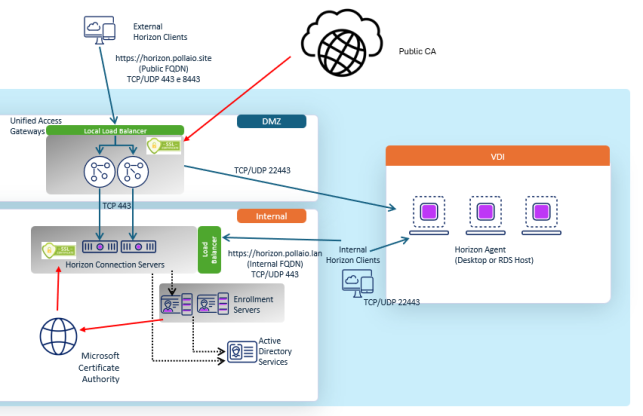
Think of the certificates as passports:
Certificates on Connection Servers
Your Horizon Connection Servers are the brains of the operation. By default, they come with a self-signed certificate. That’s fine for a lab, but in production it’s a recipe for distrust and compatibility issues.
Replacing it with either:
means your Horizon Clients and web browsers connect seamlessly and securely. Bonus: no frantic helpdesk calls about “why does Horizon keep saying untrusted connection?”
Here are more details on how to install the certificates
Certificates on Unified Access Gateways (UAGs)
The UAG is your secure doorway to Horizon from the outside world (more time behind a load balancer). And here, public CA certs are king. Imagine asking a remote contractor to install your company’s internal root CA certificate just to connect—that’s not going to fly.
With a trusted public certificate:
Here are more details on how to install the certificates
The Secret Sauce: Certificates and True SSO
Now, let’s talk about one of Horizon’s coolest features: True SSO.
True SSO lets users log into Horizon desktops and apps with their identity from Omnissa Access—no extra password prompts or integrate with other SAML idP. Behind the scenes, Horizon uses short-lived, smart card-like certificates to authenticate the user to the desktop.
Guess what makes this magic possible? Certificates.
So, without properly set up certificates, True SSO doesn’t fly.
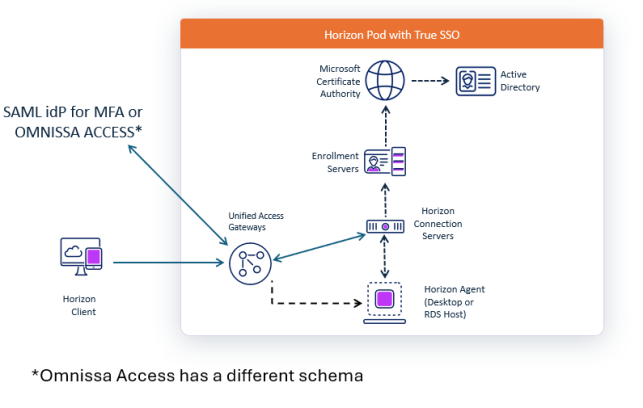
Here are more details on how to install the certificates (coming soon)
Wrapping It Up
Certificates might not be glamorous, but in an Omnissa Horizon + Omnissa Access environment they are foundational:
Think of them as the quiet guardians of your virtual desktops: invisible when done right, but disastrous if ignored.
So next time you see a certificate renewal reminder, don’t sigh. Smile. Because your Horizon users—and your future self—will thank you.