Attention, I am experiencing some anomalies after activating the hybrid environment… I advise you to wait for news before proceeding.
LDAP replication fix: The April 8, 2025 update (KB5055523) introduced an LDAP replication issue when Windows Server 2025 is mixed with older Windows versions. The November 11, 2025 patch (kb5068861) resolves this issue
Hey, good news!
As of early August 2025, Horizon now supports Windows Server 2025 in brownfield environments. If you’re already running Horizon and thinking about tossing in a Server 2025 box, here’s the breakdown: what you need, what to tweak, and some handy commands to make it happen.
All information is taken from the official Omnissa KB (Windows 2025 support for Horizon brownfield installations (6000960) )
A jump into the past
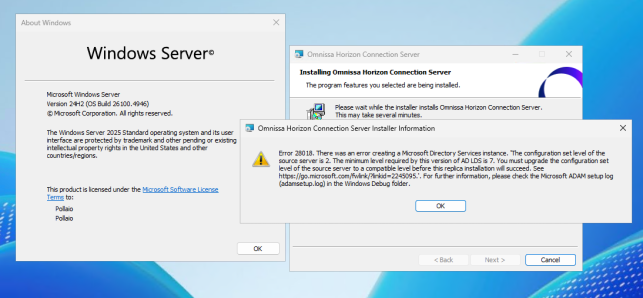
Before… when trying to install the Connection Server Replica role on Windows Server 2025 and trying to insert it into a pod containing Windows Server 2016, 2019, and 2022, you would get this error:
Requirements
Ensure all Connection Server machines within the pod are updated with the Microsoft Windows 2025 February update or later release (for more details, check the official Omnissa KB)
All Windows 2025 machines hosting the Connection Server must have the Microsoft November 11, 2025 patch (or later) installed. This is required for:
- AD LDS functional level update: Without the required patch, updating the AD LDS functional level will cause the AD LDS instance to fail. Refer to Microsoft’s documentation: AD LDS service startup fails if updated without required patches.
- LDAP replication fix: The April 8, 2025 update (KB5055523) introduced an LDAP replication issue when Windows Server 2025 is mixed with older Windows versions. The November 11, 2025 patch (kb5068861) resolves this issue
Fresh installs on WS 2025 with Horizon v2503 will default to FL-7 for AD LDS. But if you’re joining WS 2025 to older Horizon Connection Servers that haven’t had their FL bumped, you’ll hit a replica error (“minimum level required by this version… is 7”)
Omnissa has released a script to upgrade FL to version 7 (Supported from Windows Server 2016 onwards)
Step-by-Step: What to Do

All check and upgrade steps in my YouTube video:
https://www.youtube.com/watch?v=aR2qvvlY9gc
What You’re Looking At
|
Component |
Requirement |
|---|---|
|
Horizon version |
v2503 or later |
|
AD LDS Functional Level |
Must be 7 (WS 2025 default), not 2 |
|
Action Required |
Check and update FL before pod join |
A Quick Tech Tip
“Horizon 2503 or later will set functional level to 7 for fresh install of the connection server on Windows 2025 and to 2 for anything before Windows 2025.”
— Omnissa internal forum
So yeah—if you’ve done a fresh install on WS 2025 after Horizon 2503, you’re golden. But mixing in older AD LDS configs? That’s when things break… but this post is the answer.