If you’ve ever tried to configure Horizon Agent Update in your Omnissa Horizon Connection Server, you might have run into this not-so-friendly error message:
“Server certificate for metadata file URL is not trusted.”

At first sight, it sounds like your Connection Server simply doesn’t like your certificate – but the truth is a little more subtle. Let’s dig in.
What happens
You configure your metadata file URL, you make sure HTTPS is in place, you test the connection… and boom, Horizon refuses to trust your certificate. You double-check:
So why is Horizon being so picky?
Missing Certificate Usage
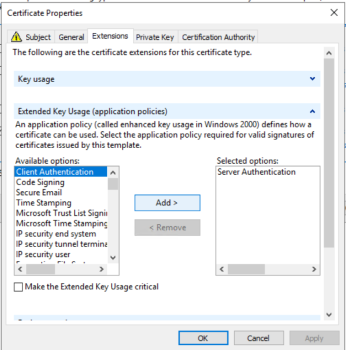
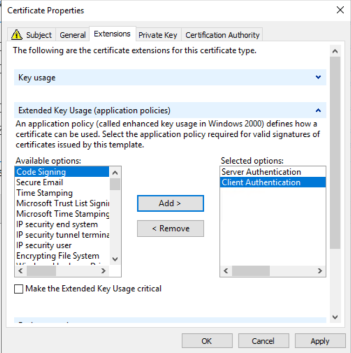
Here’s the trick: Horizon Agent Update doesn’t just expect a server certificate with the classic “Server Authentication” usage. Nope, it also expects the certificate to include “Client Authentication” in its Enhanced Key Usage (EKU).
That’s right – your poor certificate is standing at the door with only the “Server Authentication” pass, while the bouncer (Horizon Connection Server) insists it needs both passes to get in.
The Fix
The solution is simple once you know it:
Message Error

Where are the EKU values when enrolling for a certificate from Microsoft CA
How to verify the EKU
You can use this powershell script
#Check EKUs of a certificate in the Local Machine\My store
# Replace "yourcert.domain.com" with your certificate subject

$cert = Get-ChildItem -Path Cert:\LocalMachine\My | Where-Object { $_.Subject -like "*yourcert.domain.com*" }
if (-not $cert) {
    Write-Host "Certificate not found!" -ForegroundColor Red
    return
}

Write-Host "Checking EKUs for certificate:" $cert.Subject -ForegroundColor Cyan
$requiredEKUs = @(
"1.3.6.1.5.5.7.3.1", # Server Authentication
"1.3.6.1.5.5.7.3.2" # Client Authentication
)

$certEKUs = $cert.EnhancedKeyUsageList | ForEach-Object { $_.ObjectId }
foreach ($eku in $requiredEKUs) {
   if ($certEKUs -contains $eku) {
      Write-Host "✅ Found EKU: $eku" -ForegroundColor Green
      } else {
      Write-Host "❌ Missing EKU: $eku" -ForegroundColor Red
    }
}
Conclusion
So the next time Horizon Agent Update gives you the “not trusted” cold shoulder, don’t just stop at the usual certificate checks. Verify the Enhanced Key Usage and make sure your certificate is dressed up for both server and client roles.
Sometimes, even certificates need a little multitasking spirit! 😉