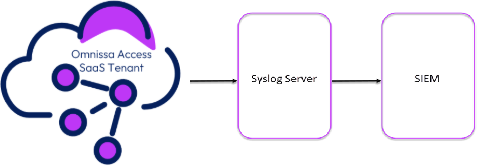
If you’re running Omnissa Access SaaS and you haven’t enabled syslog yet, here’s your gentle-but-firm nudge: do it now. No, seriously. Your SIEM is hungry, and syslog is the buffet.
Let’s dig into why syslog matters, and how you can set it up in less time than it takes to reboot a stubborn printer.
Why Should I Enable Syslog?
You might think, “Access logs are already there in the console. Isn’t that enough?”
Short answer: Nope.
Longer answer:
What Events Can I Capture?
Omnissa Access can emit audit events, system events, user authentication, and admin actions. Think:
All this, neatly packaged as syslog messages you can parse, alert on, or just hoard like a proper security engineer.
How to Enable Syslog in Omnissa Access SaaS
Requirement
Setting up syslog in Omnissa Access SaaS is surprisingly painless.
Navigate to the Integrations section in the Omnissa Access SaaS Admin UI.
You’ll find the syslog settings under SIEM
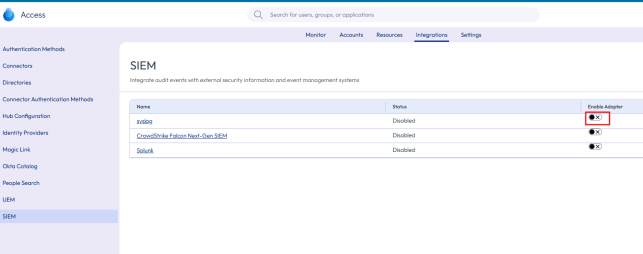
Toggle it on, and enter your syslog destination (IP or FQDN), port, and protocol (TCP or UDP).

Where
A tag appends to the syslog raw
Select which log levels
Currently the syslog server needs to be published on the internet (this might cause some headaches) in order for the Access SaaS solution to be able to send logs.
Save your settings and check your syslog server for incoming logs. A quick tcpdump or tail on your syslog endpoint can help confirm delivery.
Bonus Tip: Test It!
Try logging in as a test user, change a policy, or simulate a failed login — and watch the logs roll in. If your SIEM lights up, congrats — you’ve just levelled up your visibility game.
My syslog, in this case for the test, is a normal RSYSLOG installed on UBUNTU OS.
I can see a lot of information:
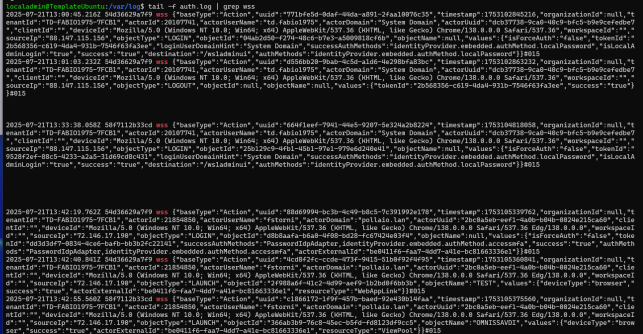
Where can we see this action:
And many other information like configuration changes, deleted or viewed objects (such as policies).
Pro Tips
🏁 Final Thoughts
Syslog isn’t just for compliance checkboxes — it’s your window into what’s happening inside Omnissa Access. Whether you’re defending against intrusions or just troubleshooting a login issue on a Friday at 5 PM, you’ll thank yourself for turning it on.
So go ahead — feed your SIEM. You know it’s hungry. 🍽️